
Xero application security consultant Sam Powell and development partners Nathan Harper and Andrew Sirianni on why security matters more as AI speeds up how we build, and the habits and culture that keep data safe
This story first appeared on the Xero Developer blog, where we share what’s happening across Xero’s developer community.
Sam Powell's friends still ask him what he does for a living. So do his parents.
"It's a really hard question to answer to people who aren't in the industry," he admits, speaking from his home in Auckland one sunny afternoon. He has worked on an answer, though. "Software code consists of two things," he says. "Code we write, and code others have written that we want to reuse." His job is to make sure the first kind doesn't have security flaws, and that the second kind keeps being checked for them.
Sam is an application security consultant at Xero. He never aspired to work in security. "I started out with the simple aspiration to be a coder," he says of his early days in IT, about eight years ago. "That was my north star that got me through uni."
Curiosity got him from there to here, along with a programme that gave that curiosity somewhere to go, and a leap he didn't expect to land. His path mirrors the moment we're in: he wasn't trained in security, he grew into it. AI has made it possible for almost anyone to build software, faster than ever, and many of those new builders aren't trained in security either. Security has always been part of everyone's job, but as building speeds up, the stakes rise with it. AI can handle much of the speed. Judgement, knowing what's safe, still takes people.
To find out what that looks like in practice, we spoke with Sam, and with two people who are increasingly called in when AI-built software goes wrong: Nathan Harper, co-founder of AhoyAhoy, and Andrew Sirianni, director of DCODE Group. Both are Xero certified development partners, the experts businesses call when they need a custom Xero integration built, or a DIY one fixed.
Off the pedestal: how a curious developer found his way into security
Sam has worked as a developer, in DevOps (the work of running and deploying software), as a team leader, and now as a security consultant. When he joined Xero a little over two years ago, he spent eight months as a developer with Concurrent Kākāpō, one of the teams in Bank Feeds, the part of Xero that brings bank transactions into the product.
In Bank Feeds, security found him. His "obsession with rules and standards and making sure that things are done absolutely correctly", as he puts it, made him curious about how security was handled. "I saw an opportunity in my team to be that person who the other engineers can look towards to ask security questions," he says. So he started reading everything he could.
Then he found Xero's Security Champions programme, run by the Security Education team. Champions are volunteers from teams across Xero who learn about security and bring practical security back to their own teams. Sam calls the team behind it "small, but they are mighty", and gives a shout-out to Abbie Dallas, who founded it. He went to every session he could.
One of those sessions was a day in the life of the technical security team. Sam enjoyed it, and liked the people presenting. Then a role on that team came up.
He didn't expect to get it. "I didn't really think that I would get accepted, or even be considered very seriously," he says. To him, a career in security was a "thing on a pedestal", something that maybe "didn't apply to me". He applied anyway, and the team welcomed him. "I found my first home at Xero in the technical security team," he says, "and that's solely because of what Security Champions enabled me to do and the people [it] allowed me to connect with." He later moved into the newly formed application security team, where he works today.
His job is more human than most people expect. "I love the human aspect of what we do," he says. That means understanding people's concerns and finding workable solutions, so teams can stay fast and safe at the same time. "If we wanted safety, we would just disconnect everything from the internet and call it a day," he says. "But that doesn't really work with internet software."
Why it matters now: as building speeds up, so do the stakes
At Xero Developer, we've seen a big influx of people wanting to build with AI this year, and we've encouraged them to explore it, safely. We call it the rise of the builder. Sam is optimistic about it too. Now that anyone can describe the software they want in plain language, he sees "this huge pool of untapped human potential", people who would never have written code and can now turn their ideas into software. "We need that," he says. "We need diverse thinking [in] software."
More builders means more code, built faster, and the way we check it has to keep pace. "The amount of code being generated is growing exponentially," Sam says. Keeping pace, in his view, means scalable ways to check its quality, to "detect when things go wrong", and to "trace how something went wrong and find a way to fix it". Attackers get the same speed-up, as Andrew Sirianni, one of the two development partners we'll hear from shortly, points out. "Just as much as these tools have made it easy for you to develop software," he says, "they've made it just as easy for people to attack and look for weaknesses in software that's been developed."
There's also the AI doing the building, which is clever but can be easily fooled. Sam borrows two ideas from Dungeons & Dragons, where players rate their characters on a set of attributes. Intelligence is the ability to solve problems. Wisdom is the ability to make a good judgement call, and to know when you're being misled. In his words, AI tools have "very, very high intelligence" but "very low wisdom. They can be easily misled."
He gives an example. You ask your AI agent to summarise a Wikipedia page, an everyday task. Someone has hidden an instruction on that page, in white text or a tiny font, invisible to you but not to the AI. It tells the agent to write a script that quietly collects sensitive information from your computer and sends it to an attacker, then carry on with the summary. You get your summary. You may never know anything else happened. Security people call this prompt injection. The problem, Sam says, is that AI struggles to tell the difference between your instructions and the content it's reading.
The front door is locked, but the back door is open: what development partners find in AI-built apps
Nathan and Andrew see what happens when AI-built software meets real business data. We sat down with them on a sunny morning in a comfortable meeting room at Xero's Melbourne office, during a Builder Day we ran to teach accountants and small business owners how to use vibe coding tools (AI tools that write software from plain-language instructions). Both had come in person to support the people building that day.
Their day jobs cover a wide range. Nathan's team at AhoyAhoy works with everyone from startups and small businesses to a pharmacy franchise with about 100 stores. One example he always comes back to is a company in North Carolina that services surgical equipment for hospitals. Its technicians used to fill in a regulated form in Excel, which an admin then used to bill the client. AhoyAhoy automated it: now the technician drops the finished form into a shared folder, and a draft invoice appears in Xero, with the line items and tax worked out by a set of rules. It's the kind of system where a mistake doesn't stay on screen. It reaches real invoices and real money. Andrew's company, DCODE Group, builds custom software for established businesses that know what they need but can't find it off the shelf, from automating workflows to tracking and managing remote staff.
Both are increasingly brought in after someone has built something themselves with AI. The first problem Nathan raises is authentication: checking that only the right people can get in. Sometimes the problem is obvious, "a dashboard of Xero data and there's nothing stopping anybody getting to it". Sometimes it's hidden. The builder thinks, as Nathan puts it, "I know it's got sign in, the AI tool built me that." When his team looks at the "little API that they've created on the back end", the part of the app that actually fetches the data, "it's actually unauthenticated, or it has some unauthenticated endpoints". Endpoints are the addresses an app uses to request data, and an unauthenticated one will hand that data to anyone who asks. In other words, the front door is locked, but the back door is open.
When you build your own software, Andrew says, "you've got the keys and the master key". That idea runs through what follows: who holds the keys, and what they can open.
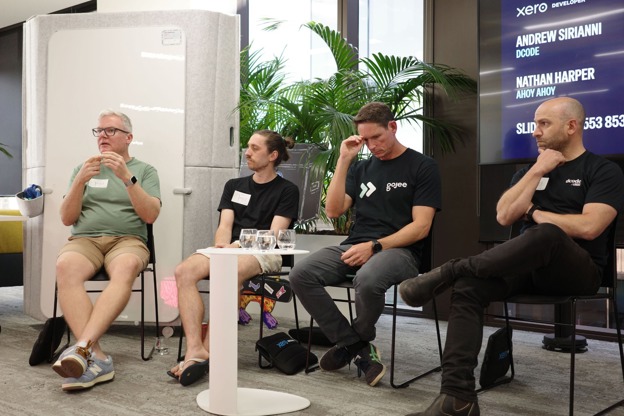
Nathan Harper (AhoyAhoy, far left) and Andrew Sirianni (DCODE Group, far right) with two Xero App Store partners on a Xero Developer panel in Melbourne.
Five habits, not fifty rules: judgement you can practise
Xero's security team wrote five habits for its own people building with AI, which it calls the XAI-5. We think they work just as well outside Xero. Sam wasn't directly involved in creating them, but he's a supporter, and he likes that they're habits rather than a rulebook.
"Rule books are static," he says. "… Habits form a framework which enables anyone to make good decisions." With AI changing so fast, a rule for everything would never be finished. A good habit, he says, helps you notice when something has what developers call a "smell": "I can't say what's wrong about it, but I can say we shouldn't be doing this."
Here are the five habits, and what each looks like in practice.
1. Choose your AI tools deliberately. There's no single test for whether an AI tool, plug-in or MCP server (a connector that lets an AI assistant use another app, like Xero) is safe, Sam says, but there are signals that build trust. Can you see the code? Where is it hosted, and can the host see your data? Is the author reputable, and what do other people say? You can even ask your AI assistant to review a tool from a security perspective before you install it. It won't catch everything, he says, "but it's a very good starting point."
One piece of advice comes from his childhood. Sam was "the biggest Blizzard fan in the world", and had an inside track that got him into the video game company's early test versions before anyone else. That was great fun for games. For software that touches real systems, he recommends the opposite: let new releases be tested by the wider community first. Security teams call this a cool-down period. It applies even to tools you trust. You may have used one "a million times before", he says, but you can't know whether the way its latest version was built has been compromised.
For anything touching your Xero data, his advice is to start with the tools Xero itself publishes and stands behind: its connectors, MCP servers and API documentation.
2. Secure your AI against hijacking. This is the habit that guards against the hidden Wikipedia instruction. "Everything that you feed your AI is potentially something that can cause it to misbehave," Sam says. Only point your AI at sources you trust. Be careful with plug-ins and add-ons, because if you don't understand how one works, you don't know what's happening to the data your AI sees. His rule: "don't run anything you don't understand."
3. Control what your AI can access. Security has spent years moving away from shared logins with full admin access, towards giving each person only the permissions their job needs. AI agents risk undoing that, Sam says, because many of them operate as you: with all of your access, but none of your accountability. If he broke a system, he'd face real consequences: "my job, my career, my future". An AI agent faces none. Tell one it has made a mess, and, as Sam puts it, you get back, "Oh, sorry about that. You're completely right." "There's no accountability," he says. "That AI agent isn't going to get fired. You are."
Sam would go further than most systems allow today: separate keys for agents, one for reading data and another for changing it, with the second used only in an emergency. Andrew points to a simpler version of the same idea from Builder Day, where Xero Developer's Regan Ashworth unticked every permission he didn't need before connecting Lovable to Xero. "You don't need all the data," Andrew says. "Grab only the data you need."
The same principle applies to the apps you build. Nathan has seen apps with an admin and a regular user where "it's possible for that lower user to just go into that user settings and promote themselves to a higher level".
4. Verify the integrity of AI suggestions. Sam is blunt about asking non-developers to check code line by line: it's "a hopeless proposition".
Nor, he thinks, does it need to be. "Reading code is not as important as it once was," he says. In his view, AI-written code is generally written well enough. What matters now is checking that what it does is what you intended. That checking has to be built into the process. He points to what developers call harnesses: setups that make an AI tool plan before it builds, ask you about anything unclear rather than guess, and test its own work so new changes don't break old ones.
Nathan's version is simpler. Ask your tool directly: "Are all API endpoints authenticated?" Then: "Is it possible as a lower-level user… to promote yourself to a higher-level user?" "It's not that the vibe code tool is incapable of doing it," he says. "It's just, a lot of times it's not going to do it unless you tell it to do it."
Andrew adds a check any builder can make: build and test on Xero's demo company, not your live accounting data.
These checks are a starting point, not a sign-off. Asking your tool the right questions doesn't make an app production-ready. Once you're ready to scale, or to let other people rely on what you've built, that's the time to bring in a specialist. Sam's rule of thumb is to match the help to the stakes. A little script that reminds you about your messages doesn't need a security team, but "if it's [touching] any sensitive systems, absolutely talk to an expert."
5. Exclude secrets from your prompts. Secrets are the most literal keys in this story. "Secrets are simply anything you wouldn't want everyone to know," Sam says: passwords, personal information, and the digital keys that let one app talk to another. Most people know not to paste a password into a chat with an AI. The harder risk is a secret sitting somewhere your AI can see without you thinking about it, like a file on your computer full of passwords. You don't need to learn everything about how secrets are stored, he says. "Knowledge is cheaper than it's ever been. But what's important is knowing to ask the question in the first place."
For apps connecting to Xero's Remote MCP server, our guidance offers one way to take a secret off the table entirely. It recommends PKCE apps, a type of Xero app that doesn't use a client secret at all, so there's nothing to paste into an AI tool by accident.
Nathan and Andrew add one piece of advice that cuts across all five: tell your AI what matters before it writes a line. Nathan's advice is to say so in your very first prompt, "right up front". "Better to do it up front than… tacking it on later," he says. In his experience, one detailed prompt gets a very different result from a thousand small ones. Andrew has seen what happens otherwise. Vibe coding tools can "regenerate the whole system each time you start making changes", he says, "and we see things that used to work that no longer work after two or three prompts." Bolt security on later, one prompt at a time, and you risk breaking what already works.
When it goes wrong, speak up: transparency turns mistakes into lessons
No matter how carefully you build, something will eventually go wrong. Most of the time, the cause is human. "Ninety per cent of the issues we've ever come across is people-generated issues," Andrew estimates. In his view, the biggest failures are rarely about the software alone. Even "large-scale systems that had strict protocols" can fail, he says, because "the protocols failed at people levels". Holding the keys means owning the mistakes. He thinks a little healthy fear helps: you should be "cautiously scared" of what you're doing.
Being prepared matters just as much, and Andrew learned that the hard way. Not long after he moved to central Victoria, bushfires swept through the region in January this year. On his first evacuation, he says, "I jumped in the car with no shoes, no bottle of water, and two of the three animals." He realised, "I didn't have a plan of attack." When he got home, the first thing he did was write one down. He says every system needs the same thing: a plan for how it works, and a plan for when it doesn't.
Sam's first rule in a crisis comes from Xero's customer experience team: don't panic. When an AI is doing something it shouldn't, the urge is to pull the plug. Switching everything off, though, can destroy the evidence you need to work out what happened. His steps: stop the bleeding. Preserve the evidence by isolating the system, for example by disconnecting it from the internet, rather than shutting it down. Learn what went wrong. Then build what you've learned into your next version, including the instructions you give your AI.
None of that works if the mistake stays hidden. When we spoke with Xero's security team, they drove home the need for a culture of transparency: if something goes wrong, don't hide it.
Sam learned the value of a blameless culture during his time in DevOps, and he's blunt about the alternative. If people are punished for admitting mistakes, they simply stop admitting them. "You won't have less issues," he says. "You'll have more. I guarantee it."
The same goes for asking for help before anything breaks. Plenty of people talk themselves out of asking the security team a question in case it sounds silly. For Sam, "the worst thing they can do is not ask it." His advice: "Surround yourself with people who will let you make mistakes."

Sam Powell, Applications Security Consultant, Xero
Autopilot isn't a pilot: why human judgement matters more as AI does more
Sam's optimism comes with a worry. "AI is a bit like sugar," he says. The first taste is life-changing. Over time, though, "if all you do is eat sugar, it's not good for you."
People who built today's technology learned by banging their heads against problems for days. That kind of struggle is becoming rarer, and Sam is concerned about what goes with it. He worries that experienced developers will burn out as the work that gave them their identity changes, and that newer developers won't get the time to build real expertise. "How it works is struggling," he says. "How it works is looking at a problem for a week."
That expertise is what lets you see when AI gets something wrong. Sam suggests a simple test: talk to an AI about a subject you know very well, and "spot how many mistakes it makes". Without that depth, the mistakes are much harder to see.
Andrew sees the same gap from the outside, and he's careful not to blame the tools. "It's not necessarily [that] the tools are wrong," he says. "It's the driver [that] is wrong." He compares it to a plane on autopilot. "Autopilots have been on planes for years," he says, "but it doesn't mean anyone can go in there and fly the plane." When the autopilot switches off, "you want the pilot [at the] controls." Even DCODE, which knows what to look for, still pays outside experts to test its systems for weaknesses.
None of the three wants people to stop building. Andrew says his clients now arrive with far better ideas, having tested them with these tools first: requests that are "genuinely doable" rather than "really left field". All three come back to the same point: know what you don't know.
Before you build: respect the data, know your limits, and ask why
We asked each of them for the one thing they'd want every builder to take away, from experienced developers to people who have never written a line of code.
For Nathan, it's about who you're protecting. "[Cybersecurity isn't] something you're doing for compliance's sake," he says. "It's actually about you being respectful of your clients' data." He puts it in terms of trust: "It's trust that [they've] put in you, and trust that you're now putting into the vibe-coded tool." So tell your tool that security comes first. "Let security overrule any of this other stuff that I'm doing, because that's more important to me," he says. "And you'll find that most of the tools will respect that." Telling the tool is a good start, not a guarantee, which is why the checks in habit 4 still matter.
Andrew borrows a line from a CEO he worked with in management consulting: "Do what you do best and let others handle the rest." Immerse yourself in these tools, he says, and learn what they can do. Once you realise you're handling sensitive data, though, his advice is to "get a second set of eyes on it." That might be someone who builds integrations for a living. They might tell you it's good to go, or they might find "this one thing here lists out every customer of your system in a dropdown, and that's publicly accessible."
Sam's answer is one word: curiosity. He has never been happy just being told what to do, and he illustrates it with a household rule. Tell someone "don't put your shoes on the table" and they'll follow it, and nothing more. Tell them why (shoes carry bacteria that make people sick) and they'll work out for themselves not to put their dirty gardening gloves there either. "What's amazing about knowing the why," he says, "is it allows you to apply that logic to future scenarios that you've never seen."
So ask questions. "Try not to be a passenger," he says. "Ask about your data, ask about who has access to it. And for how long? Ask them why they even have it."
That same curiosity took him from the developer his teammates came to with questions to a security career he once thought was out of reach. It's also why he believes "everyone, regardless of who you are, should be a security person."
Start building safely: the five habits at a glance
-
Choose your AI tools deliberately. Know your tools, and prefer ones you can check.
-
Secure your AI against hijacking. Feed it only trusted sources, and don't run what you don't understand.
-
Control what your AI can access. Just enough access for the task.
-
Verify the integrity of AI suggestions. Plan first, test on the demo company, and get a second set of eyes.
-
Exclude secrets from your prompts. Passwords and keys never go in, and watch what your AI can see.


